
ZTNA and iDMZ—The Gold Standard for OT Remote Access
Requirement: This module addresses the secure brokering of remote OEM access to onboard OT environments, satisfying IACS UR E26 requirements for authenticated and controlled conduits.
In the maritime world, enabling remote access to critical Operational Technology (OT) networks is essential for maintenance. However, directly exposing these systems to the internet is an unacceptable risk.
The Challenge: Why VPNs & Jump Hosts Fail OT
Traditional “Secure” methods actually increase the vessel’s attack surface in two specific ways:
The “Full-Tunnel” Risk
Standard VPNs grant Layer 3 access. Once an OEM connects, their laptop is “virtually” inside the ship. If that laptop is infected, the malware can scan and attack every PLC on the subnet via Lateral Movement.
The “Jump Host” Vulnerability
Maintaining a Windows Jump Host in the iDMZ requires constant patching. If left unpatched, it becomes a Permanent Beachhead for hackers to sit and wait for the right moment to pivot into the engine control system.
The Zero Trust Solution: Access is granted to the Service/Application (e.g., HMI Web Port 443), not the network. The user never “sees” the IP address of the PLC.
The Solution: ZTNA in the iDMZ
An iDMZ (Industrial DMZ) acts as a neutral buffer zone. Critically, it serves as the secure environment for the ZTNA Gateway.
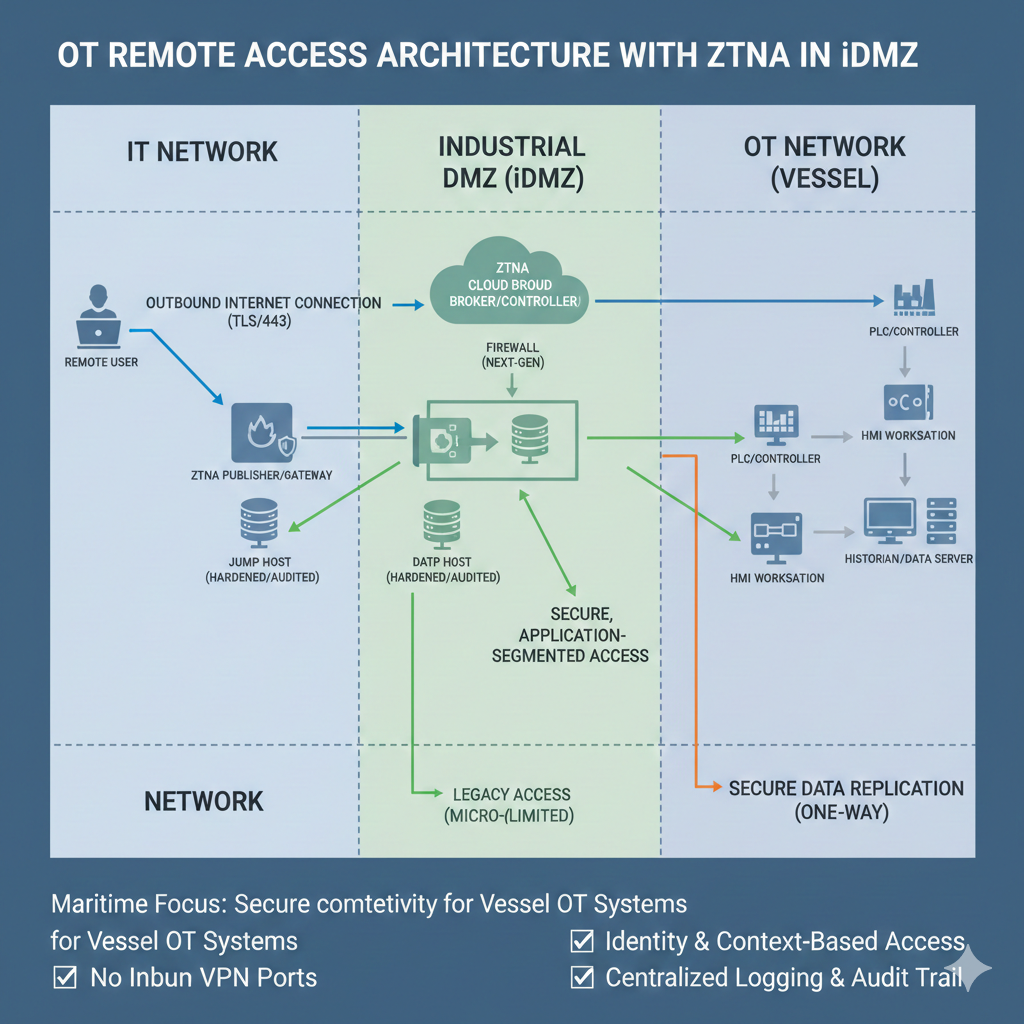
Fig 2.1: ZTNA Gateway Architecture for Multi-Vendor OT Environments.
The ZTNA Connection Flow
Unlike a VPN, which opens a “door” into your network and then asks for a key, ZTNA keeps the door hidden behind a brick wall. The connection is only “stitched” together once identity and health are proven.
The Cloud Broker verifies the OEM’s identity via MFA. Simultaneously, it performs a Device Health Check. If the engineer’s laptop has a disabled firewall or an active virus, the broker kills the request before it even reaches the ship’s satellite link.
Standard firewalls have “Inbound Listeners” that hackers can scan. The onboard ZTNA Gateway uses Inside-Out Connectivity. It reaches out to the broker to “pick up” the authenticated user. To the rest of the internet, the vessel appears to have no open ports—it is effectively invisible.
Instead of joining the network (Layer 3), the user is bridged to a specific Application Socket (Layer 7). If they are authorized for the “CCTV HMI,” they cannot “see” the Engine Control System, even if it’s on the same physical switch.
Key takeaway: By using Step 3, you eliminate the risk of an OEM’s “dirty” laptop spreading a worm across the ship’s internal OT network.
Firewall and Policy Configuration
To implement this, the firewall must be configured with a “Default Deny” posture. Use the following logic to configure the iDMZ conduits:
The Advantages of ZTNA 2.0 in the iDMZ
Access is not just granted once; the ZTNA system continuously verifies identity and device health throughout the session.
Hardened, purpose-built appliance. Drastically reduces the patching burden compared to a general-purpose Windows/Linux server.
Policies are enforced based on identity and application, allowing multi-vendor access without complex firewall rules.
Implementing the iDMZ with ZTNA maintains the absolute security and integrity of a vessel’s critical operational systems.
Next Section
On-Demand Access Control & Logging
Phase 2: Protect All vessels Satisfies: E26 §4.2.6 E27 §4.2 IMO MSC-FAL.1 All vessels Remote Access: The Digital Gangw...
