
Network Segmentation (retrofits)
This guide implements practical zone isolation for existing vessels where full system redesign is not possible, using VLANs, industrial firewalls and physical separation to achieve meaningful segmentation.
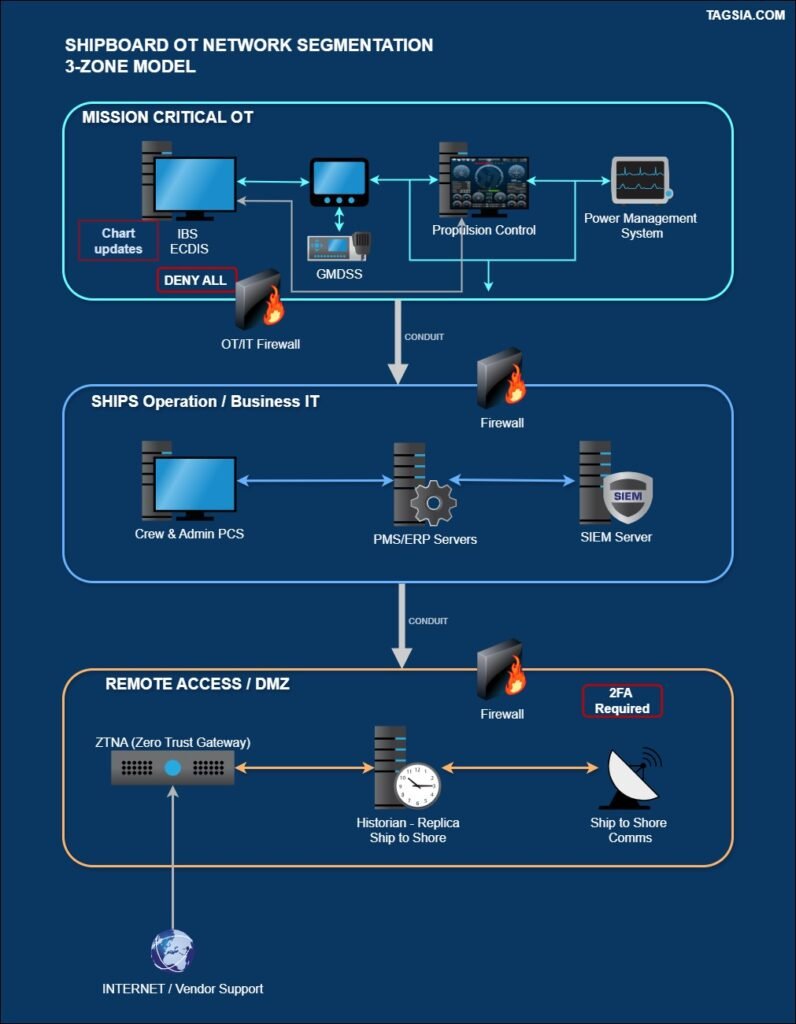
Network segmentation is the single most effective way to prevent an initial breach (e.g., a phishing email on the crew IT network) from disabling or seizing control of your critical Operational Technology (OT) systems.
This guide translates the foundational concept of Zones and Conduits from IACS UR E26 and IEC 62443 into a practical implementation plan for existing vessels seeking to retrofit zone isolation for security compliance.
Scope: Best Practice Guidance, Not a Binding E26 Requirement
IACS UR E26 is a newbuild standard. It applies to vessels contracted for construction on or after 1 July 2024. Existing vessels are not directly subject to E26 class survey requirements. This guide applies E26 principles as industry best practice for retrofit segmentation — the standard references in the checklist below indicate the E26 clause each control is derived from, not a binding compliance obligation for your vessel unless your class notation specifically requires it. Check with your Classification Society if you are uncertain about your vessel’s obligations.
TAGSIA Tags: IACS UR E26 (3.1) — best practice reference; IEC 62443-3-3 SR 1 (Zones & Conduits); IMO/ISM Code §11.2
1 Zone 1: Mission-Critical OT (The Citadel)
- Assets: Bridge systems (ECDIS, Radar), Propulsion/PMS, Steering, Safety Systems.
- Requirement: Maximum Availability & Integrity. Air-gapped or Firewall-restricted.
- Action: All data crossing this boundary must be brokered through a Stateful Firewall with a “Deny All” default rule. A managed switch with VLAN tagging alone does not constitute this boundary.
Zone 1 boundary rule: Where physical cabling constraints make dedicated runs impractical, use a dedicated unmanaged switch for the OT segment feeding into a single industrial firewall as the sole gateway. Do not substitute this with VLAN tagging on a shared managed switch.
2 Zone 2: Ship Operations / Business IT
- Assets: Admin (HR, Cargo), Crew Internet, CCTV, Inventory.
- Requirement: Standard IT controls. Susceptible to phishing.
- Action: Use 802.1Q VLANs to separate crew from admin from CCTV within this zone. Place a firewall at the Zone 1 boundary — not at the Zone 2 internal boundaries, where VLANs are sufficient.
Correct use of VLANs: VLAN tagging between crew Wi-Fi, admin PCs, and CCTV within Zone 2 is appropriate and sufficient — these are systems of similar low criticality with no direct OT interface.
3 Zone 3: Remote Access / DMZ (The Air Lock)
- Assets: ZTNA Gateways, Jump Hosts, VSAT Comms termination.
- Requirement: High Protection / Low Trust. All external traffic terminates here before any access to Zone 1 or Zone 2 is considered.
- Action: External traffic lands at ZTNA. MFA is mandatory for all entry. Jump hosts in this zone are the only permitted path into Zone 1 for remote maintenance — via the firewall conduit.
Note on SIEM placement: If deploying a SIEM, do not place it in Zone 3 without careful consideration. A SIEM must receive logs from Zone 1, which requires an inbound connection crossing the firewall. Place the SIEM in Zone 3 only if your firewall supports one-way log forwarding (syslog push from Zone 1 to Zone 3) with no return path permitted.
Vessel Network Security Checklist
Use this checklist to verify that your segmentation strategy aligns with the E26-derived best practices for retrofit security. The Standard Reference column indicates the E26 or IEC 62443 clause each control is based on. These are voluntary best-practice targets for existing vessels unless your class notation specifies otherwise.
Retrofit Implementation Tip
When implementing on an existing vessel, use 802.1Q VLAN tagging to separate crew, admin, CCTV, and other non-critical systems within Zone 2 only. Ensure your core switch is Managed to support VLAN boundaries and ACLs.
Where legacy PLCs or sensors do not support VLAN tagging, connect them to a dedicated unmanaged switch and route that switch’s uplink through a single industrial firewall interface. This gives you a clean, auditable Zone 1 boundary without touching the OT devices themselves.
Compliance Note: A managed switch with VLAN tagging is a Layer 2 control only. It does not inspect traffic, enforce stateful policy, or satisfy the conduit requirement under IACS UR E26 §4.2.1.1 and IEC 62443-3-3 SR 5.1. Presenting VLAN-only separation as your Zone 1 boundary to a Class auditor (DNV, LR, ABS) will not satisfy the conduit enforcement requirement.
Known Limitations of Retrofit Segmentation
Retrofit segmentation can significantly reduce risk but cannot replicate a purpose-built E26 newbuild architecture. The following limitations are inherent to most existing vessel installations and should be documented in your risk register.
NMEA 0183 is a one-way serial protocol operating below the IP layer — it cannot be inspected or blocked by a network firewall. Modbus RTU over RS-485 has the same constraint. These protocols require physical isolation (serial-to-Ethernet gateways with application-layer filtering) to achieve meaningful segmentation.
Many PLCs, sensors, and control panels on existing vessels were designed before network security was a consideration. They accept any connection from any IP on their subnet. Firewall-enforced zone isolation is the primary — and often only — compensating control available without replacing the hardware.
On many vessels, OT and IT traffic shares the same physical switch fabric or cabling runs. Even with VLANs configured, a misconfigured trunk port, a compromised managed switch, or a technician plugging into the wrong port can collapse zone boundaries. Document all shared infrastructure as a residual risk.
Many OEM vendors (propulsion, PMS, navigation) retain their own remote access paths — often direct modem or VSAT connections that pre-date your zone design. Audit all vendor remote access paths and ensure they terminate in Zone 3 (DMZ), not directly into Zone 1. Undocumented vendor connections are a common audit finding.
Documentation advice: These limitations should be formally recorded in your vessel’s cyber risk register as accepted residual risks with compensating controls noted. For vessels pursuing a class cyber notation, discuss these constraints with your surveyor early — they are recognised challenges, not automatic disqualifiers.
The specific regulatory requirements this playbook satisfies. Use these references when preparing for Class survey or responding to a surveyor's checklist.