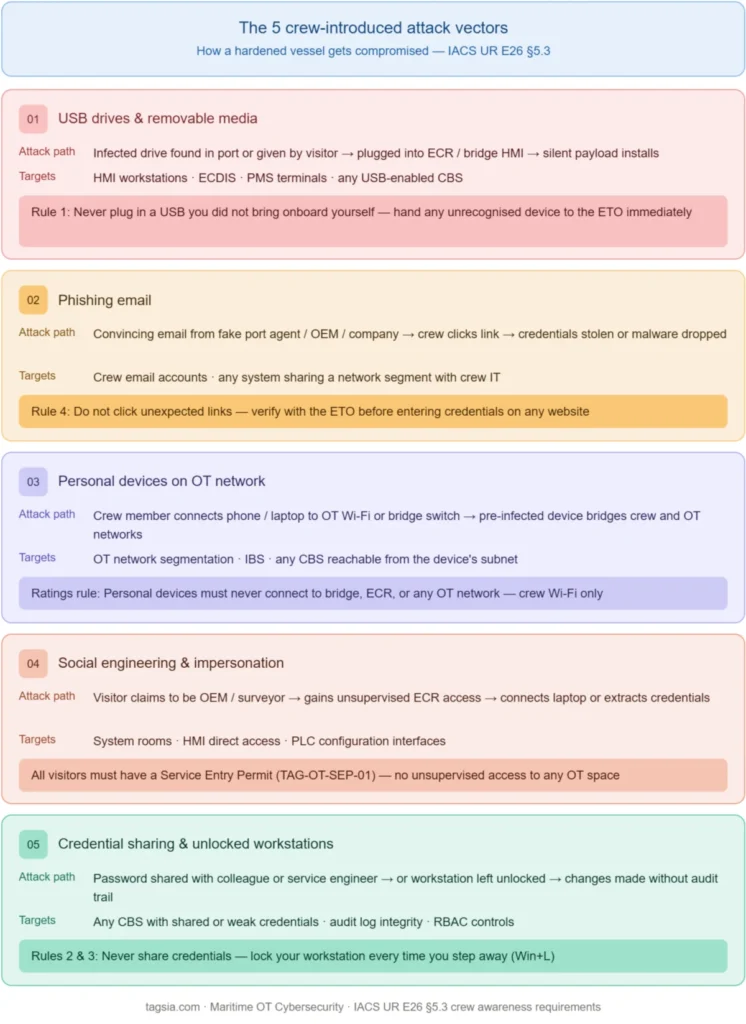
This guide covers the cyber security familiarisation and drill programme that the shipowner must maintain throughout the vessel’s operational life — preparing crew to recognise, report and respond to cyber incidents affecting onboard systems.
The most technically hardened vessel in the world can be compromised by a crew member who plugs in an infected USB drive, clicks a phishing link, or hands their credentials to a visiting service engineer without verifying identity. Cyber security is not an IT problem — it is a seamanship problem.
Why crew awareness is a regulatory requirement
E26 §5.3 is explicit: awareness training is not optional. The regulation requires a documented programme — not a one-time briefing — covering the vessel’s cyber security procedures, the crew’s specific responsibilities, and what to report and to whom.
The human vector is the most common
Analysis of maritime cyber incidents consistently shows that the initial breach involves a human action — a USB device, a phishing email, or an unlocked workstation. Technical controls alone cannot stop a crew member who does not know the rules.
Class surveyors will ask crew directly
During an E26 audit, a Class surveyor will ask crew members — not just the ETO — about cyber procedures. If a rating cannot explain what to do if they find a USB drive, this is a finding against the training programme.
ISM Code §6 requires documented training
The ISM Code requires that all personnel receive training relevant to their duties. For vessels under IMO MSC-FAL.1/Circ.3, this now includes cyber security awareness. Evidence must be available for PSC inspection.
BIMCO and P&I clubs assess it
BIMCO v4 includes crew training as a core requirement. P&I clubs increasingly review training records when assessing incident liability — a vessel without a documented programme faces reduced coverage in a cyber incident claim.
Cyber security roles — who does what
Every crew member has a cyber security responsibility, but the depth varies by rank. The table below defines the minimum requirement for each role.
Role
Primary responsibility
Minimum awareness required
Master
Ultimate authority for cyber incident decisions. Authorises network isolation. Receives Cyber SITREP from ETO.
Understand severity levels. Know when to authorise isolation. Know reporting obligations to shore and flag state.
Chief Engineer
Responsible for OT system availability. Must understand safety implications of cyber controls on propulsion and power.
Which systems are in which security zone. When a cyber action could affect machinery operation.
ETO
Primary implementor of all cyber security controls. Maintains asset inventory, manages credentials, applies patches, executes incident response.
Full technical programme — all TAGSIA playbooks across all five phases.
Chief Officer
Responsible for bridge systems. Must ensure ECDIS, AIS, and bridge CBS are used in accordance with security procedures.
USB hygiene. Physical access to bridge. How to report a navigation system anomaly.
All officers
Workstation, email, and crew internet use must follow the acceptable use policy. Must report suspicious activity immediately.
Phishing recognition. Password policy. USB rules. Reporting procedure.
Ratings
Must not connect personal devices to OT networks. Must not plug USB drives into bridge or ECR workstations.
What not to connect. What looks unusual. Who to tell.
The five rules every crew member must know
These five rules cover the most common human-vector incidents in maritime OT. Every crew member — regardless of rank — must be able to recite and demonstrate these. Class surveyors will test them.
Rule 1Never plug in a USB drive you did not bring onboard yourself
A USB drive found in a port, given by a visitor, or left behind by a service engineer is the single most common malware delivery method in maritime OT. Even a drive that “just has charts on it” can carry a payload that installs silently on an HMI.
The rule: Any USB device that needs to connect to a bridge or ECR workstation must be scanned at an isolated scanning station first and authorised by the ETO. Hand any unrecognised USB to the ETO immediately — do not plug it in to “check what’s on it.”
Rule 2Never share your login credentials — with anyone
Sharing a password with a colleague “to save time” or handing credentials to a visiting service engineer are among the most common audit findings. Every user must have their own account on every system they access.
The rule: If a service engineer asks for your credentials, refuse and contact the ETO. If a system requires a shared account, the password must be changed immediately after each use and documented in the service entry log.
Rule 3Lock your workstation when you leave it — even for 5 minutes
An unlocked workstation in the ECR or bridge is an open door to any system it can reach. A visitor or colleague can make changes, install software, or extract data in under two minutes on an unattended session.
The rule: Lock the screen before stepping away from any OT workstation. On Windows: Win + L. The screensaver auto-lock must be set to 5 minutes maximum on all bridge and ECR workstations.
Rule 4Be suspicious of unexpected emails, links, and attachments
Phishing emails targeting vessel crew are increasingly sophisticated — appearing to come from the company, a port agent, or a known OEM. Clicking a malicious link on a crew computer that shares a network with bridge systems can give an attacker their initial foothold.
The rule: Do not click links in emails you were not expecting. Do not open attachments from unknown senders. If an email asks you to enter credentials on a website, verify with the ETO first. If in doubt — delete it.
Rule 5Report anything unusual immediately — do not wait
The most costly cyber incidents are those that went unreported for hours. A workstation behaving strangely, an alarm that cannot be explained, a system that will not log in, or a network device you do not recognise — all are potential indicators of compromise.
The rule: Report anything unusual to the ETO immediately. Do not try to fix it yourself. Do not reboot the system — a reboot destroys the forensic evidence in RAM that the ETO needs to diagnose what happened.
Recognising phishing and social engineering
Social engineering — manipulating people rather than hacking systems — bypasses technical controls entirely. Crew must be able to recognise the common patterns.
Attack type
How it appears onboard
What to do
Phishing email
Email appearing to be from the company, port authority, or OEM asking you to click a link or open an attachment. May use a slightly wrong email address.
Do not click. Check the sender address carefully. Report to ETO. Delete.
Vishing (voice call)
A caller claiming to be from IT support, Class society, or a vendor asking for system credentials or remote access details over the phone.
Never give credentials over the phone. Take a name and callback number. Verify via a known contact before calling back.
USB drop
A USB drive found in a common area, on the gangway, or given as a “gift” or “charts” by a port contact. Designed to be plugged in out of curiosity.
Hand to ETO. Never plug in. Label and quarantine until scanned on an isolated device.
Impersonation
A visitor claiming to be a service engineer or Class surveyor who asks for unsupervised access to a system room or wants to plug in their laptop.
All visitors must be verified against the Service Entry Permit. No unsupervised access to OT spaces. Contact ETO before granting any access.
Pretexting
A message creating urgency — “the system needs an emergency update NOW or we lose propulsion” — to bypass normal approval procedures.
Urgency is a red flag. Any emergency system change still requires ETO authorisation. Slow down and verify.
The cyber drill — the equivalent of a fire muster
E26 §5.2 requires not just training but also exercises. Just as a fire drill tests the crew’s physical response, a cyber drill tests their procedural response. Run at least once per crew rotation and record in the drill log.
Drill format: The ETO announces a simulated cyber incident — for example, “A rogue device has been detected on the OT network.” The crew executes the response procedure without any actual system changes. The drill tests whether each crew member knows their role. Debrief immediately after and record the outcome.
Cyber Drill — Step by Step
1
ETO announces the scenario
Describe the simulated incident clearly — “A device not in our asset inventory has appeared on the OT network.” Do not make it ambiguous. The goal is to test response, not guessing.
2
ETO performs initial triage (verbally)
Walk through the first 15 minutes diagnostic procedure verbally — what checks are performed, what evidence is preserved, which systems are assessed for isolation. This demonstrates the procedure to the observing crew.
3
ETO briefs the Master (Cyber SITREP)
Practise the verbal SITREP: “Master, I have a potential cyber incident. The affected system is [X]. The current risk to vessel safety is [assessment]. My recommended action is [X]. Do I have your authorisation to proceed?” The Master practises responding with a decision.
4
Crew quiz — five rules test
Ask each officer one of the five rules questions: “What do you do if you find a USB drive?” / “Who do you call first if a system behaves strangely?” / “What does Win+L do and when do you use it?” Record pass/fail for each crew member’s SMS training record.
5
Record and debrief
Complete the drill record with date, scenario, participants, pass/fail results, and identified gaps. File in the SMS drill log. Any crew member who could not answer their question must receive a follow-up briefing before the end of the current rotation.
Training record — what to document for Class and PSC
Training without records does not exist in the eyes of a Class surveyor or PSC inspector. Every awareness activity must be documented in the SMS.
SMS Training Evidence Checklist
Maintain the following records for each crew member. These are the items a PSC officer or Class surveyor will ask to see:
Initial awareness briefing — date, topics covered, crew member name and rank, ETO signature. Completed at sign-on for every crew member.
Five rules acknowledgement — a signed statement that the crew member has read and understood the five cyber security rules. Filed in the crew training record.
Cyber drill record — date, scenario used, participants, quiz results, debrief notes. Minimum one per crew rotation.
ETO-specific training — evidence of completion of relevant technical modules with dates. Required for E26 §5.2 technical competence demonstration.
Incident or near-miss reports — any crew-reported suspicious event (USB, phishing, unusual system behaviour) must be logged even if it turned out to be benign.
Surveyor tip: During a Class survey, the inspector may ask to see training records before speaking to the crew. A well-organised training log with signed acknowledgements for each crew member demonstrates a mature programme and typically prevents deeper scrutiny.
New crew onboarding — the cyber induction
Every new crew member signing on must receive a cyber security induction before being given access to any shipboard system. This takes approximately 20 minutes and should be delivered by the ETO on the day of sign-on.
Item
Duration
Content
Welcome and context
2 min
Why cyber security matters on this vessel. Brief mention of E26 and IMO obligations without jargon.
The five rules
8 min
Walk through each rule with a one-sentence explanation. Show the physical USB scanning station. Demonstrate Win+L on a workstation.
Reporting procedure
4 min
“If you see something, tell me immediately.” Give the ETO’s contact information and the after-hours protocol.
Acceptable use
3 min
What crew internet may and may not be used for. What devices may be connected to crew Wi-Fi. What is never permitted on the OT network.
Sign and file
3 min
Crew member signs the five rules acknowledgement. ETO files it in the training record. Access credentials are provisioned.
Compliance Documentation
The following Vault templates support this playbook’s training and documentation requirements.
The specific regulatory requirements this playbook satisfies. Use these references when preparing for Class survey or responding to a surveyor's checklist.
E26 §5.3
Operational life requirements — The shipowner must manage security countermeasures, maintain documentation, carry out periodic maintenance, and provide training and drills for relevant crew and shore personnel throughout the ship's life.