
CBS Verification & Diagnostics
This guide covers how to actively verify that the security controls on your Computer-Based Systems are functioning as configured — using onboard diagnostic tools to confirm that firewalls, ACLs, VLANs, and access restrictions are working in practice, not just on paper.
Installing security controls is only half the task. IACS UR E26 §4.3.2 requires that you can verify those controls are actually working. A firewall rule that was accidentally overwritten, a VLAN that was misconfigured during maintenance, or an account that was never disabled — these are the gaps a Class Surveyor will look for. This playbook gives the ETO the tools and procedure to find them first.
Why §4.3.2 Exists
E26 §4.3.2 sits within the Detect phase for a specific reason: passive monitoring (IDS, syslog) tells you what is happening on the network right now. Verification & diagnostics tells you whether the controls you implemented are still enforced. Both are needed.
Passive Monitoring
IDS, syslog, anomaly detection.
Tells you: What traffic is on the network now.
Active Verification (§4.3.2)
Diagnostics, connectivity tests, access probes.
Tells you: Whether your controls are still enforced.
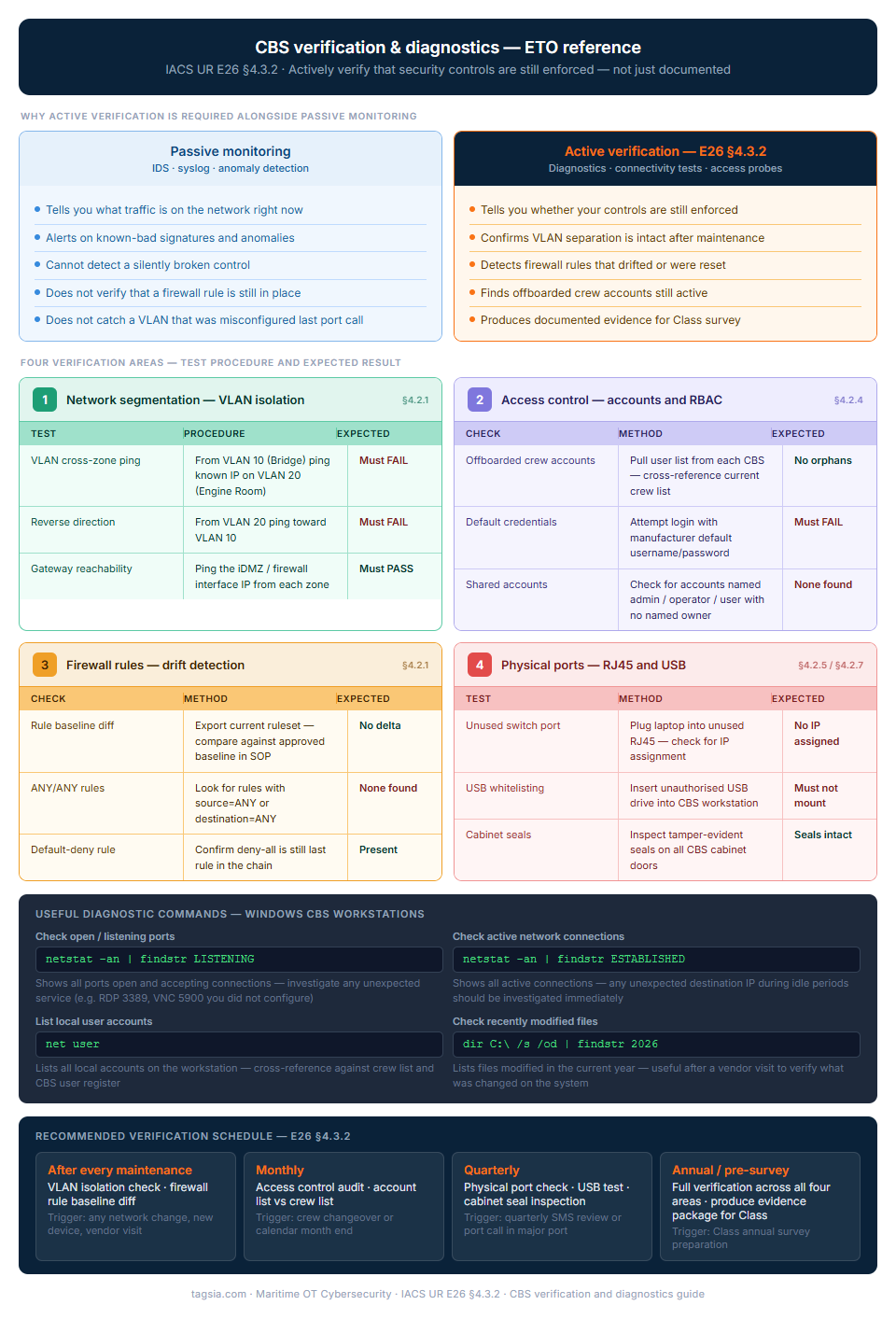
The two-pillar structure at the top of the diagram makes a point that is frequently missed in maritime cyber compliance planning: passive monitoring and active verification are not the same thing, and having one does not replace the need for the other.
An IDS and centralised syslog tell you what is happening on the network right now. They do not tell you whether a VLAN that was correct last month is still correct after the last port call maintenance window. They do not tell you whether a firewall rule that was reset during a software update has been restored. Active verification — running the four test procedures shown in the diagram — is the only way to confirm that your documented security architecture matches your actual running configuration.
The verification schedule at the bottom maps each check to a trigger rather than a calendar date because the highest-risk moment for configuration drift is after a maintenance event, not at a fixed monthly interval.
<< Click the diagram to expand at full resolution
1. Network Segmentation Verification
After any maintenance window, VLAN reconfiguration, or new device addition, confirm that OT zones cannot reach each other without passing through the firewall.
ETO Test Procedure — VLAN Isolation Check
- From a laptop on VLAN 10 (Bridge/Navigation), attempt to ping a known IP on VLAN 20 (Engine Room).
- The ping must fail. If it succeeds, the VLAN separation has broken down — escalate immediately.
- Repeat in the reverse direction: from VLAN 20 toward VLAN 10.
- Attempt to ping the iDMZ / Firewall interface IP from each zone — this should succeed as it confirms the path to the gateway is intact.
- Log the test date, result, and tester name in the Monitoring Config SOP log.
Never run active scans against live control systems (PLCs, ECDIS, AMS). Use only known management IPs and test workstations. Unexpected traffic to control systems can trigger safety alarms or watchdog resets.
2. Access Control Verification
Verify that accounts, credentials, and role-based restrictions are enforced as configured — not just as documented.
3. Firewall Rule Verification
Firewall rules can drift silently — a vendor visit that required a temporary port opening, a patch that reset defaults, or a misconfiguration during an update. Periodic rule review is mandatory under E26.
ETO Rule Review Checklist
- Export the current firewall ruleset and compare it against the approved baseline in your Monitoring Config SOP.
- Look for any rules with source = ANY or destination = ANY — these are almost always overly permissive.
- Check for temporary rules created during the last maintenance period that were never removed.
- Confirm the default-deny rule is still the last rule in the chain — all traffic not explicitly permitted must be dropped.
- Verify that remote access ports (RDP 3389, SSH 22, VNC 5900) are blocked on the OT-side interfaces unless explicitly required.
Useful command — check listening ports on a Windows CBS workstation
netstat -an | findstr LISTENING
Run this on any CBS workstation to see what ports are open and accepting connections. Any unexpected service (e.g., a remote desktop port you did not configure) should be investigated immediately.
4. Physical Port & USB Verification
Logical controls mean nothing if physical ports are accessible. Verify that hardening measures applied under the RJ45 Port Security and USB Protection playbooks have not been undone.
RJ45 Ports
Plug a laptop into an unused switch port. The port must not assign an IP address or allow any network access if port security / 802.1X is configured. An IP assignment means a port that should be disabled is active.
USB Ports
Insert an unauthorised USB drive into a CBS workstation. If USB whitelisting or device control is configured, the drive must not mount. A drive that auto-mounts means the control has been removed or bypassed.
Verification Schedule & Survey Evidence
E26 §4.3.2 does not specify a frequency, but the following schedule aligns with Class Survey cycles and is defensible to a surveyor.
What the Surveyor Will Ask
-
“Can you show me that the Bridge and Engine Room networks cannot communicate directly?”
→ Run the VLAN ping test in front of them. Have the previous test log to hand. -
“Show me the user accounts on your ECDIS/AMS — are there any accounts for people who have left?”
→ Open the user management panel live, or show the last completed TAG-OT-AUD-01. -
“What happens if I plug this USB drive into that workstation?”
→ Demonstrate it live. The drive should not mount. -
“When was the firewall ruleset last reviewed and by whom?”
→ Show the signed entry in the Hardening Audit Record with the export date and ETO signature.
Vault Forms Referenced in This Playbook
- Account & Identity Audit Log (TAG-OT-AUD-01) — quarterly account review
- Hardening Audit Record (TAG-OT-AUD-02) — firewall rule diff and USB test log
- Monitoring Config SOP (TAG-OT-SOP-02) — VLAN test results and network check log
- Cabinet Integrity & Seal Log (TAG-OT-LOG-02) — physical port spot-checks
The specific regulatory requirements this playbook satisfies. Use these references when preparing for Class survey or responding to a surveyor's checklist.