
MFA Implementation for Maritime OT
This guide covers the implementation of multi-factor authentication for all remote access to in-scope systems, with specific guidance for offline-capable MFA methods suited to high-latency maritime environments.
What Is an Untrusted Network?
Before implementing MFA, you need to know exactly when it is — and is not — required. The trigger is always the same: the presence of an untrusted network boundary. Under IACS UR E26, a network is considered untrusted if it meets any of the following conditions:
- It falls outside the scope of UR E26 — i.e., it is not part of the vessel’s defined security architecture.
- It is an external network — the internet, a shore-based office network, or an OEM/vendor remote access link.
- It is an onboard network that does not meet the same security requirements as the protected security zone it is connecting to (e.g., the crew Wi-Fi network connecting into the SMCS zone).
Practical rule of thumb: If a network is not under your direct control and has not been assessed to the same security level as your OT zone — treat it as untrusted.
When Is MFA Required?
MFA is a human-user, boundary-crossing control — not a blanket requirement for all access to OT systems. The table below summarises the key scenarios under E26 Item 31:
* M2M exception: MFA is not required for automated machine-to-machine links, but machine accounts must still authenticate using certificate-based or shared-secret mechanisms. Unauthenticated machine access is not permitted under E26.
† Physical control exception: Per E26 Item 30, HMIs providing operators with immediate access in physically controlled spaces (locked rooms, Bridge, ECR) may rely on physical access controls in lieu of authentication. This does not remove the requirement to uniquely identify human users for audit purposes where the system supports it.
ZONE POLICY: MFA for internal high-security zone access is not a mandatory E26 baseline requirement, but may be required depending on the security level assigned to that zone in the vessel’s security plan.
E27 Note (Newbuilds): For vessels under UR E27, MFA is not just a configuration item — it must be a built-in design requirement. E27 §4.2 requires that MFA capability is specified as a system-level design requirement during the newbuild phase. ETOs on newbuilds should verify with the shipyard that the authentication architecture is designed for offline-capable MFA from the outset, not retrofitted after delivery.
Passwords alone are no longer sufficient to protect critical shipboard systems. Multi-Factor Authentication (MFA) adds a second layer of verification—something you know (password) and something you have (a token). However, traditional SMS-based or App-based codes often fail mid-ocean due to lack of cellular signal or VSAT latency.
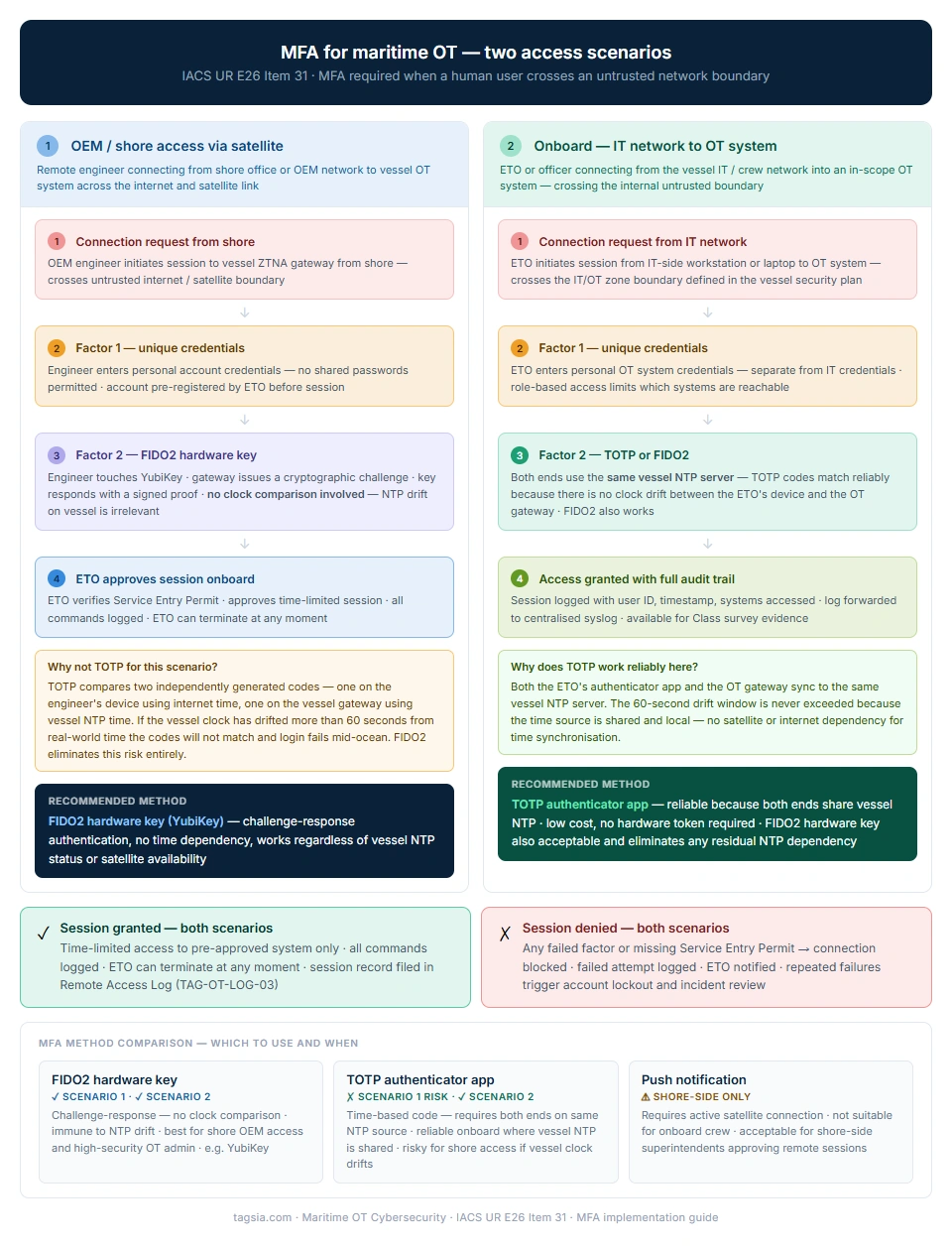
The two scenarios shown here solve a problem that generic IT security guidance consistently gets wrong for maritime. Standard MFA advice assumes a stable internet connection and a reliable time source — neither of which can be guaranteed on a vessel mid-ocean.
Scenario 1 (shore OEM access via satellite) requires FIDO2 because TOTP relies on clock synchronisation between the engineer’s device and the vessel gateway. If the vessel NTP server has drifted, TOTP codes will not match and the session fails. FIDO2 uses a cryptographic challenge-response that requires no time comparison at all — it works regardless of vessel clock status.
Scenario 2 (onboard IT to OT access) can use TOTP reliably because both the crew member’s device and the OT gateway are on the same vessel, synchronised to the same NTP server. The drift problem does not exist when both ends share the same time source.
<< Click the diagram to expand at full resolution
The “Disconnected” Challenge
Implementing MFA at sea is difficult because most modern solutions assume a constant, low-latency connection to a cloud server (Microsoft, Google, or Okta). On a vessel, two major technical hurdles exist:
The Time-Sync (NTP) Trap
Most MFA apps use TOTP (Time-based One-Time Passwords). If the vessel’s internal clock drifts by just 60 seconds relative to the “real world” due to a lack of NTP synchronization, the codes generated by the app will be rejected by the server, effectively deadlocking the system while the ship is mid-voyage.
The Steel Cage (RF-Hostility)
Ship engine rooms and lower decks act as Faraday Cages. Requiring an ETO to receive an SMS or a “Push” notification on a smartphone is impossible in these zones. Without a physical hardware-based alternative, the security measure becomes an operational blocker.
Recommended Maritime MFA Methods
To remain compliant with E26 while ensuring operational safety, we prioritise Offline-capable MFA methods:
MFA Token & Hardware Key Registry
Hardware-based MFA (such as YubiKeys) is the gold standard for securing satellite terminals and administrative OT access. Surveyors frequently verify the chain of custody for these assets; use this registry to track serial numbers, assigned personnel, and the physical location of emergency backup keys.
Compliance Documentation Previews
Standardized templates and technical logs. View watermarked previews below; All fillable forms and SOPs are free with a registered account.
The specific regulatory requirements this playbook satisfies. Use these references when preparing for Class survey or responding to a surveyor's checklist.