
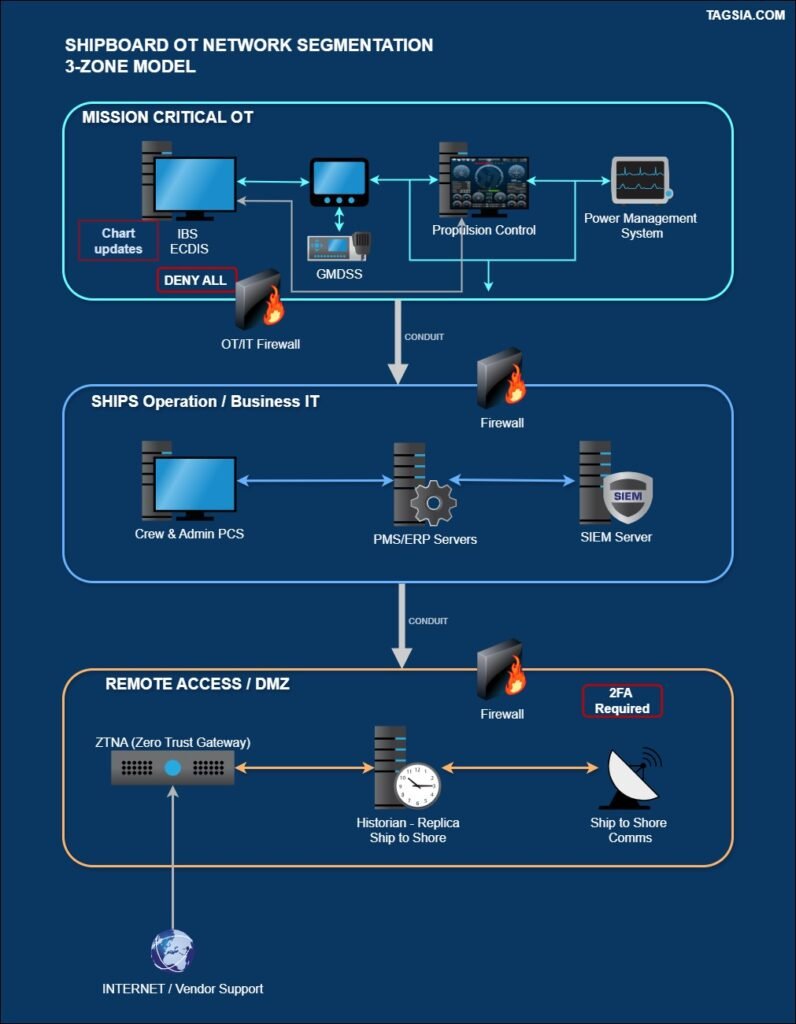
Network segmentation is the single most effective way to prevent an initial breach (e.g., a phishing email on the crew IT network) from disabling or seizing control of your critical Operational Technology (OT) systems.
This guide translates the foundational concept of Zones and Conduits from the IACS UR E26 and IEC 62443 standards into a three-step practical implementation plan for existing vessels seeking to retrofit zones for security compliance.
TAGSIA Tags: IACS UR E26 (3.1); IEC 62443-3-3 SR 1 (Zones & Conduits); IMO/ISM Code §11.2
1. The Core Concept: Zones and Conduits
Historically, many ships treated the entire network as one large, flat “trusted” zone. Segmentation divides this flat network into smaller, distinct Security Zones based on system criticality and security requirements.
- Security Zone: A collection of systems (assets) that share the same security needs (e.g., all systems that, if compromised, would affect vessel safety).
- Conduit: The secure “pipe” or communication path that enforces the rules for traffic flowing between two zones (e.g., a firewall, router, or Layer 3 switch with Access Control Lists).
The Principle of Least Privilege: If a system in one zone doesn’t need to talk to a system in another zone, the conduit must block the traffic by default (Deny by Default).
2. Step-by-Step Implementation: The Three-Zone Model
For most vessels (especially mixed-age fleets), a three-zone model based on asset criticality is the most pragmatic starting point for compliance.
Zone 1: Mission-Critical OT (The Citadel)
- Assets: Bridge systems (ECDIS, INS/IBS, Radar), Propulsion/Power Management Systems (PMS), Steering, Safety Systems (GMDSS, VDR).
- Security Requirements (Highest): Maximum Availability (A), Integrity (I), and stringent Change Management. No direct internet access.
- Actionable Segmentation: These systems should be physically or logically isolated from all other networks. Ideally, they are on a dedicated VLAN/subnet with no routing outside the zone, except for specific, logged, and necessary updates (e.g., chart updates via a single data diode or secure update server in a Demilitarized Zone/Conduit).
- Traffic Rule: Deny All inbound/outbound traffic unless explicitly required for safety-critical data exchange.
Zone 2: Ship Operations / Business IT
- Assets: Administration (accounting, HR), General Crew Systems (email, internet access), Cargo/Ballast Control Systems (non-safety critical), CCTV, Inventory Systems.
- Security Requirements (Medium): Standard IT security controls, strong authentication. Susceptible to phishing/malware.
- Actionable Segmentation: This zone requires a stateful firewall at its boundary with Zone 1 to protect the OT. It should also be segmented internally using VLANs to separate crew internet from administrative IT.
Zone 3: Remote Access / DMZ (The Air Lock)
- Assets: Jump Servers, Cyber Security Monitoring Tools, Patch Management Servers, Vendor Remote Access Gateways, Ship-to-Shore Communication Servers (V-SAT/Cellular).
- Security Requirements (High Protection/Low Trust): This zone is highly exposed and acts as a buffer between the untrusted outside world and the trusted internal zones.
- Actionable Segmentation: Traffic from the internet must first land here. All remote users (vendors, shore staff) must authenticate to a Jump Server within this DMZ before being allowed (via a separate Conduit) to access Zone 1 or 2 systems.
3. Practical Implementation Checklist (Onboard Tasks)
This checklist focuses on using existing hardware (VLANs on Layer 3 switches, firewalls) to enforce the Zones.
| Task | Category | IACS/IEC Alignment | ETO/Superintendent Action |
| 1. Asset Discovery | Identify | E26 (3.1) | Document every connected device (IP, MAC, purpose, criticality, vendor). Identify legacy protocols (e.g., Modbus, Serial over IP). |
| 2. Physical Separation | Protect | E26 (3.2) | Verify physical cable paths for critical OT systems are separate from IT and secured in locked cabinets. |
| 3. VLAN/Subnet Creation | Protect | E26 (3.2) | Create a minimum of three dedicated VLANs/subnets (OT Critical, IT Admin, Guest/Crew). Assign ports on L3 switches accordingly. |
| 4. Conduit Installation | Protect | E26 (3.4) | Install a dedicated OT/IT Firewall or configure a Layer 3 switch with ACLs (Access Control Lists) to control traffic flow between the new zones. |
| 5. Firewall Rule Set | Protect | IEC 62443 (SR 1) | Start with DENY ALL. Then, explicitly add only the required protocols/ports/IP addresses. Example: Only allow port 8000 from the Chart PC in Zone 2 to the ECDIS in Zone 1 for chart updates. |
| 6. Secure Gateway | Protect | IEC 62443 (SR 6) | Configure a Jump Host or Remote Access Solution in the DMZ (Zone 3) to enforce two-factor authentication for all remote vendor connections. |
| 7. Change Management | Respond/Recover | E26 (3.6) | Update your SMS annex to require documentation and CSO/DPA approval for any change to the Zone/Conduit ruleset. |